| Online Click Games |
|---|
 Flip Words Game Flip Words Game
 
Plays: 6597
Category: Puzzles Games
You'll flip over our new word game: Flip Words! Click on letters to make words and solve familiar phrases. The first letter of each word you make will be revealed in the phrase you're trying to solve. Once you recognize the phrase, you can submit your guess--or, try to reveal all the letters for a special bonus! You'll never run out of phrases because you can create your own and automatically download new phrases created by others!
Full version features
Fun, easy to learn and addictive gameplay!
Create words while solving familiar phrases
Automatically download new phrases created by others!
Global high scores let's you compare words and scores with others
Create your own phrases to share with others!
|  Color Star Game Color Star Game
Plays: 6594
Category: Puzzles Games
Colorful game where you click the balls that are the same color as the flag, but its not that easy! world and balls behaviours change with every new level. Relax with this fun and colorful game _
Try beating all the levels, there is more challenge than you think here.
There is also a Wii compatible version at: http://www.mordaza.byethost18.com/colorstarwii640.php
-
Colorido juego donde haces click en las bolas que tienen el mismo color que la bandera, pero no es tan facil! los comportamientos de las bolas y el mundo cambian con cada nuevo nivel. Relajate con este divertido y colorista juego _
Trata de pasar todos los niveles, aqui hay mas desafio de lo que crees.
Hay una version compatible con Wii en: http://www.mordaza.byethost18.com/colorstarwii640.php |
 Box2D Physics Game Box2D Physics Game
Plays: 6573
Category: Other Games
This is a physics game with the Box2D physics engine. It took me about 3 hours to create, and it took a lot of thinking.
If the game is too long and it doesn’t show the whole thing, try full screen mode or by pressing F11. To go back to regular size press F11 again or move your mouse cursor to the top of the screen and click the square that’s next to the close button (AKA the giant X).
I made this whole thing with the guidance of Emanuele Feronato’s blog.
The numbers on the top left are the mouse x and y positions/values. They’re pretty useful.
I will try to create levels when I get more experience. |  Word Search Game Word Search Game
Plays: 6565
Category: Education Games
Word Search is a dynamically generated puzzle - a unique challenge every time! Select your difficulty and start the game! Use the mouse to click and drag to select a word. If you find a word, you'll hear a gratifying *cha-ching* but if you miss it, a not so gratifying *fart*. |
 Care Bear Color Game Care Bear Color Game
Plays: 6560
Category: Other Games
Color this cute picture of a Care Bear. Use the paintbrush to select colors and click on each section to paint in it. Color the various clothes, people, accessories, and hair of the characters to make them look their best. | 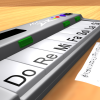 ASD Piano Master Composer Game ASD Piano Master Composer Game
Plays: 6557
Category: Education Games
ESPAÑOL ABAJO
=============
The ASD Piano is a device made by I2 Interactive and sold widely everywhere. Here you can have fun playing with it. It has 7 keys that correspond to the 7 notes and you can play them by pressing the corresponding keys on your Keyboard A-S-D-F-G-H-J
In this game you have 3 modes to have your fun time with the ASD Piano TM.
Free Mode: Here you can play as you like, pressing the keys as you wish, click the Back button to go to tittle screen.
Memory: You will hear a short melody and then you have to play it again, many short melodies will pop and after succesfully playing them you can submit your score to the Hi-Score table.
Composer: You can compose your own original pieces!! and share with your friends, show the world the talent you have!!
In the composer screen press the "REC" button to start making your composition, play the keys that you wish and feel the best, you can play several keys at the same time and get awesome results. When you feel its finished hit the "STOP" button to finish the recording,
You can adjust your piece speed altering the value given at the bottom left and also you can add a background loop to acompany it selecting from the available tunes from 1 to 6.
You can hear your original piece clicking the "PLAY" button, click "STOP" to halt it at any point, with the playhead stopped you can click on any part of your pentagram, the playhead will go there, and playing any keys there will modify that part, you can click on "ERASE PART" to delete the notes on that part.
If you click "ERASE ALL" the whole piece will be deleted so be careful, also clicking "Back" will delete the piece so save first.
To save it you have to click the "SAVE" button and then, there is a white square at the bottom, right click on it and on the menu click "Select all" then right click again and on the menu click on "Copy" then open your Windows Notepad, go to START then ALL PROGRAMS and then ACCESORIES, then click on Notepad and there select Edit menu and Paste, then click on File and Save to save it anywhere you like.
To load your piece or your friends compositions first of all select the whole composition that you have received (starts and ends with a number), then right click on it and select Copy, then in the ASD Piano, once in the Composer mode right click on the white square at the bottom and select Paste then click on the "LOAD" button and now you can click on "PLAY" to listen to it, or you can edit that to add your own modifications.
You can also click on the premade songs to load them, doing that will load the entire song so be sure to save your work first, see what our talented team has made and learn from there.
ESPAÑOL
=======
El ASD Piano es un dispositivo creado por I2 Interactive y vendido ampliamente por todo el mundo. Aqui puedes divertirte jugando con el. Tiene 7 teclas que se corresponden con las 7 notas y puedes tocarlas presionando la tecla correspondiente en tu teclado A-S-D-F-G-H-J
En este juego tiene 3 modos para pasar un buen rato con el ASD Piano TM.
Free Mode: Aqui puedes jugar como quieras, presionando las teclas como desees. Haz click en el boton Back para regresar a la pantalla de titulo.
Memory: Oiras una corta melodia y despues deberas tocarla de nuevo, muchas cortas melodias iran apareciendo y una vez que las toques correctamente puedes enviar tus puntos a la tabla de Hi-Score
Composer: Puedes componer tus propias piezas originales!! y compartirlas con tus amigos, muestra al mundo el talento que tienes!!
En la pantalla del Composer presiona el boton "REC" para empezar a crear tu composicion, toca las teclas como prefieras y sientas de la mejor manera, puedes tocar varias notas a la vez y conseguir increibles resultados. Cuando sientas que esta terminada dale al boton de "STOP" para detener la grabacion. Puedes ajustar la velocidad de la pieza variando el valor dado abajo a la izquierda y tambien puedes añadir una musica de fondo como acompañamiento seleccionandola de la lista de Tunes disponibles de 1 a 6. Puedes tu pieza original dandole a "PLAY", haz click en "STOP" para detenerla en cualquier punto, con la cabeza lectora (flecha verde) parada puedes hacer click en cualquier parte del pentagrama, la cabeza lectora ira alli, tocando cualquier nota ahi modificara esa parte, puedes hacer click en "ERASE PART" para borrar solo esa parte. Si haces click en "ERASE ALL" se borrara toda la composicion asi que ten cuidado, tambien haciendo click en "Back" se borrara toda la composicion asi que salva antes de salir.
Para salvar tu composicion debes hacer click en "SAVE" y luego, en un cuadro blanco situado abajo, haz click con el boton derecho del raton, y en el menu que sale haz click en "Seleccionar todo" luego haz click de nuevo con el boton derecho y selecciona "Copiar" ahora abre tu Bloc de Notas de Windows, ve a "Inicio", luego en "Todos los programas" y despues en "Accesorios", luego haz click en "Bloc de Notas", una vez que se abra, en el menu "Edicion" selecciona "Pegar", luego haz click en "Archivo" y "Guardar" para guardarlo donde quieras.
Para cargar tu pieza o la de tus amigos primero de todo selecciona toda la composicion que tu has recivido (comienza y termina con un numero), luego haz click con el boton derecho en ella y elige "Copiar", luego en el ASD Piano, una vez que estes en el modo Composer, haz click con el boton derecho en el cuadro blanco de abajo y elige "Pegar" luego haz click en el boton "LOAD" y ya puedes hacer click en "PLAY" para escucharla o puedes editarla para añadir tus modificaciones. Puedes tambien hacer click en las canciones prefabricadas "Premade" para cargar una de las 5 melodias disponibles, haciendo esto cargara la cancion entera asi que asegurate de salvar tu composicion antes, mira lo que nuestro talentoso equipo ha hecho y aprende a la vez. |
 Seabed Bubble 3 Game Seabed Bubble 3 Game
Plays: 6547
Category: Action Games
Shoot the bubbles as many as possible before the bubbles are close to the seabed. You can Shoot the bubbles by forming groups of 3 or more of the same color. You must reach the required scores to play the next levels. Move your mouse to aim. Click to shoot. |  Cop Baby Game Cop Baby Game
Plays: 6540
Category: Puzzles Games
Raise your baby to be a good cop! A point and click adventure game. |
 Hollywood Vacation Dress Up Game Hollywood Vacation Dress Up Game
Plays: 6537
Category: Dress-Up Games
Dress up this girl for her adventures in Hollywood. Pick and click the various tops and bottoms, necklaces, hair, and other accessories onto the girl to dress her up and make her look her best during her Hollywood, California vacation. |  Phineas And Ferb Dress Up Game Phineas And Ferb Dress Up Game
Plays: 6537
Category: Dress-Up Games
It is a hot day in Danville, so Phineas and Ferb are committed to have the best day ever! They kept thinking all morning about things they could do and in the end they agreed to throw a super cool party at their backyard beach and everyone to be invited...and when I say everyone I mean the guest list includes you too. Yes. You're invited to Phineas's and Ferb's beach party but...only if you pass a test...a fashion test. Show off your fashion skills while playing the "Phineas and Ferb" dress up game and make sure you get enough points to participate in what promises to be the hottest beach party of the whole year!! |
 Civilization Quest Game Civilization Quest Game
Plays: 6536
Category: Adventure Games
Journey through the ages in a simple and short point-click quest |  Hidden Gemstones: Christmas Rooms Game Hidden Gemstones: Christmas Rooms Game
Plays: 6531
Category: Adventure Games
Search for 30 hidden gemstones, after all gemstones found door will open and you will be able to escape!
Try to escape as fast as you can in order to receive best score. Good Luck! |
 Hidden Stars - Caves Game Hidden Stars - Caves Game
Plays: 6530
Category: Adventure Games
Search for stars that hidden in caves! You have only 300 seconds to find all stars! Each picture contains five hidden stars! Good Luck! |  Where Is My Left Sock? Game Where Is My Left Sock? Game
Plays: 6524
Category: Action Games
Can you help Mr. Shen find the 10 left socks he needs so he can go on vacation? A simple hide-and-seek game with all original art and some other stuff he put together on the train. |
 50 red Game 50 red Game
Plays: 6521
Category: Other Games
Interactive Artwork meets frantic clicking game in the all new sensory overload game by me - 50 Red!
Click 50 red balls whilst avoiding the blue balls for a place in high scores paradise. WARNING - FLASHING IMAGES! |  Field Goal Game Field Goal Game
Plays: 6519
Category: Sports Games
Click to drag the cross hairs into position, be sure to take the wind into account. Then, click the kick button. |
 Van The Brave Elf Game Van The Brave Elf Game
Plays: 6518
Category: Action Games
The name of that young and brave elf, is Van.
With his big slingshot, he will retrieve
the orb and keep the village in peace.
For the sake of the village, he bravely
takes this mission without fear.
So the journey begin.... |  MapleStory Kill Panda Game MapleStory Kill Panda Game
Plays: 6517
Category: Action Games
MapleStory Kill Panda
Try to kill The Panda
Control:
01.WSAD/Move
02.Shift/Speed Up
03.Space/Use Item
04.Mouse Click/Attack |
 Math Lines Game Math Lines Game
Plays: 6515
Category: Puzzles Games
In this game there will be lines of balls with numbers on them. You can shoot balls to add new balls to the line. When the balls you shoot and the balls beside it add up to 10, these balls will be destroyed. You can also destroy a group of same numbered balls with only one ball. When you destroy all the balls you can proceed to the next level. If the balls reach the hole, then you lose the game. Occasionally there will be coins that appear on the screen, you can shoot the coins to get the colours of the balls sorted for a while, it will be a lot easier. Use the mouse to control the direction of the shots and click to shoot. You can also press the space bar to swap between the ball to shoot and the next ball to shoot. |  Blokz Game Blokz Game
Plays: 6512
Category: Puzzles Games
Click groups of 2 or more bricks to pop them, clear the target amount before time runs out and get through ten levels. The more bricks you pop at once, the higher your score, pop enough and you’ll get points bonuses. |