| Online Left Games |
|---|
 Aboe Heart Pluck Game Aboe Heart Pluck Game
 
Plays: 2361
Category: Adventure Games
Control Aboe to collect all the heart in this simple puzzle platform game. Don't run out of time and avoid all obstacle and get for the highest score. |  Rabbit Game Rabbit Game
Plays: 2359
Category: Adventure Games
Collect Eggs. Jump mouse left click |
 Aces Up Solitaire Game Aces Up Solitaire Game
Plays: 2358
Category: Shooting Games
In this game you need to remove all the cards until only the aces are left. When the top cards of two columns have the same suit, you can click the lower ranked one to remove it. Aces are the highest ranked cards. | 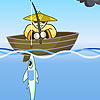 Fish Hunter Game Fish Hunter Game
Plays: 2353
Category: Customize Games
Fish Hunter Game. Use mouse left click. |
 Easter Egg Designer Game Easter Egg Designer Game
Plays: 2352
Category: Customize Games
Showcase your creativity and unleash your aesthetic sense by designing your own Easter egg with a beautiful assortment of patterns, shapes and colors! The game opens with a plain Easter egg on the left of the screen, while the available patterns are located at the top right corner, and different types of shapes are placed below the patterns. To apply a pattern, simply click the left or right arrow button next to the pattern samples. The selected sample will be enlarged and shown in the middle of the five boxes, while the pattern itself will be automatically applied to the Easter egg. You may repeat these steps to modify the pattern. To select a type of shape, click the left and right arrow buttons next to the shape samples. The available shapes of the chosen type will be displayed under the sample boxes, for example, when you have selected the snowflake, three available shapes of snowflake will appear under the sample boxes. Click to select any shape you like, then drag and paste it onto the Easter egg. You may click the shape again to adjust its size by using the scroll wheel on your mouse or the + and - keys on your numpad: scroll up or press the + key to enlarge the shape, and scroll down or press the - key to reduce the size. You may also rotate the shape by pressing the left and right arrow keys on your keyboard. If you no longer wish to apply a shape, you can click to select it, then drag and drop it to the bin on the right of the Easter egg. When you have completed the design, click the "Add some color" button at the bottom right corner to proceed to coloring. You will then be given a palette of 35 colors on the right of the Easter egg. To apply a color, simply use the paint brush to select a color, then move to the desired position on the Easter egg. The area will be circled and enlarged so that you can apply the color easily. Click to paint the color, or choose another color if you wish. You may reapply colors to a certain area, or you can click the topmost arrow button on the left of the screen to undo the previous action. If you would like to clear all colors, simply click the Reset button at the bottom of the palette. You may also click the buttons on the left of the screen to save the image, print the outline, print the image in color, or clear all colors and return to the design page. Click the Finish button at the bottom right corner when you have completed all steps, and a score will be given based on the richness of your design and the time you have spent. Come and participate in the unique celebration of Easter! |  Horses Art Book Game Horses Art Book Game
Plays: 2348
Category: Other Games
Are you ready to play another fantastic horse game? In Horses Art Book we present you six different pictures and three difficulty modes. In each level there are two pictures which are seemingly identical. But depending of the mode there are different number of differences between them. In easy mode there are five, in medium- seven and in the hard mode there are nine differences. Your job is to find them all, unlocking levels one by one, in a certain time limit. The score is based on the remaining seconds of your time. As faster you discover the differences as more points you’ll get. If you don’t find all the differences on time the game ends, but you can retry as much as you want. Use your mouse to click on the spot where you did find a difference, but if you’re wrong and miss the spot, then you’ll lose five seconds of your time. To make it easier we are offering you two hints. |
 The Lava Escape Arcade Game The Lava Escape Arcade Game
Plays: 2346
Category: Action Games
Guide this cute box to his destinattion!
Use the mouse to drag him and set the direction.
Release the left mouse button in order to throw him in the desirable direction! |  Aagy Bones Game Aagy Bones Game
Plays: 2344
Category: Adventure Games
Collect all the bones in this simple platform game. Don't run out of time and avoid all the rats and obstacle and get for the highest score. |
 Four Piece Tangram Game Four Piece Tangram Game
Plays: 2344
Category: Education Games
Do not look down upon this ancient puzzle game - it may be much more complicated than you have imagined! Your task is to make use of the 4 tiles provided to form the required shapes. At each stage you will be given 4 pieces of tiles on the right of the screen, while the outline of the required shape is on the left. Click and drag the center of a tile and move it to a desired position, and you may rotate the tile by dragging it around the center, or flip the piece by dragging through the center. Note that the tiles on the shape cannot overlap and no space is allowed between them. A timer above the play area will count the time you have spent at each stage. Solve the geometric puzzles by lateral thinking! | 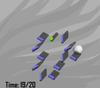 Drop Dominoes Game Drop Dominoes Game
Plays: 2344
Category: Action Games
Drop all toppled dominoes Dominoes game platform located on the lower will work on the ball. When you log in after installation by using your mouse in the game of dominoes, and reduces the minimum number of stone will be left behind You complete the section. Until every stone was left running and all the following points when the game ends. Good Luck. |
 Ball Separation Game Ball Separation Game
Plays: 2343
Category: Action Games
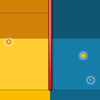
Tame the wild bouncing balls and separate them with moving walls! In this game, your goal is to make use of the gap on a movable separator so that the balls can be divided into 2 groups by the colors of the balls as well as the colors of the play area. You will be given a play area divided into two sides by a separator in the middle, and some blue and yellow balls will be bouncing around. You can use your mouse to drag the separator so that the balls can pass through the gap and move to the other side. Continue the process until the balls are separated by the colors of the balls as well as the colors of the play area. The timer at the bottom left corner of the screen will show the remaining time, and if the balls cannot be separated before the time runs out, you lose. Be sure to act swiftly in order to proceed! |  Spider Web Game Spider Web Game
Plays: 2343
Category: Action Games
Some naughty little bees have wondered into the dominion of the spider. Time for the predator to enjoy its feast! But before doing so, the spider needs to trap its preys or they will fly away. When the game opens, the spider will be lurking on the edge of its dominion. Use the four arrow keys on your keyboard to move it around and divide the area by spinning red silk and the bees will be trapped. You will receive 100 points for each bee successfully caught. Initially the spider has 3 lives, as displayed at the top left corner. If a bee cuts the silk before a web is completed, the spider will lose a life. When all of the lives are gone, the game ends. Do not let the mouth-watering preys escape! |
 Pirates Musketeers Game Pirates Musketeers Game
Plays: 2339
Category: Action Games
P1—— Press the "A.D" move to the left or right.Press the "W" to jump.Press the "S" to shoot
P1—— Press the "?.?" move to the left or right.Press the "?" to jump.Press the "?" to shoot |  I Am A Princess Game I Am A Princess Game
Plays: 2339
Category: Dress-Up Games
Pretty little princess in the palace in the evening, which will be needed to prepare for the invite. You can login by clicking the play text. Girls' favorite game of the little princess types you can easily play the game for free. Once you start the game in the middle of the left and right portions in princess clothes and other accessories easily by clicking on the button signifying can prepare you for the invitation. Good fun. |
 WHEELZ! Game WHEELZ! Game
Plays: 2339
Category: Driving Games
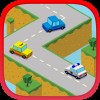
The roads are narrow and your car is fast. Can you keep your car under control and on the road? Make sure to keep your eyes on the road and watch out for those turns and obstacles! With the coins that you collect you can buy cool new vehicles and upgrades for your magnet and slow-motion powerups. Control your car by tapping the screen on the left and right side or by using the left and right keys. |  GasLauncher Game GasLauncher Game
Plays: 2333
Category: Adventure Games
Control the gas launcher through your keyboard arrows right,left,if collect the bonus points will upgrade the gas launcher,and touch rockets,clouds it will burst the gas. |
 Stop Chicken Game Stop Chicken Game
Plays: 2329
Category: Puzzles Games
Try to clear ball between chicken and dog.Add new ball to make 3 same ball and clear them. left chicken will will walk right and dog in another side will stop them.When dog meet the chicken the chicken will drop.Drop all chicken and finish the target.
select any ball and click bomb will destroy the ball. | 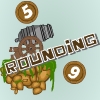 Numbers and Cannons: Rounding Game Numbers and Cannons: Rounding Game
Plays: 2329
Category: Education Games
The object of the game is to destroy all of the barrels on each level. Destroy a barrel by rounding the number in it to the nearest 10. Load the cannon with that rounded number by using your mouse to click the number button at the bottom of the screen. Use the mouse to aim and adjust the power of the shot. Left mouse click to fire cannon. |
 Battle for territory Game Battle for territory Game
Plays: 2326
Category: Action Games
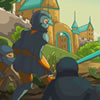
Use mouse to play.Click on your own territory, and then hold down the left mouse button and drag to the enemy or neutral territory to send troops. |  World Cup Penalty Shootout Game World Cup Penalty Shootout Game
Plays: 2323
Category: Sports Games
You’ve made it to the World Cup! You’ve reached a penalty shootout with Brazil, your country’s hopes rest in your hands, 5 shots, it’s up to you.
|