| Online screen Games |
|---|
 Drop Down D-Zango Game Drop Down D-Zango Game
 
Plays: 3926
Category: Adventure Games
The player should control the boy by using the right and left arrow keys so that the boy can stay on the screen. The boy needs to fall down from the hole so that he can stay on the screen and move to the next level.As the level increases you need to run faster and faster. | 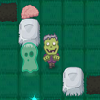 Zombie Go Home 2 Game Zombie Go Home 2 Game
Plays: 3912
Category: Puzzles Games
Help to Zombie to come to his grave.
Your goal is to guide the hero to the exit without leaving the screen. Collect as many brains as possible to gain the best score.
When you move your hero he will keep moving until hits ab obstacle. Also, you need to avoid the pits.
On later level you will meet the ghosts. They have their own path, so try to analyze the field, before start moving. You will find also teleports - they will help you a lot!
Good luck! |
 Headshire Stream Game Headshire Stream Game
Plays: 3909
Category: Action Games
The townsfolk of Headshire are hungry and cold! It`s your job as governor to collect enough resources to make them happy before nightfall in this fast-paced arcade game. Watch the bottom of your screen for the desired resource. Click on it as it floats past. Collect coins and gems that fall. You can spend these at the market to improve your game and your score. You have 15 days to win approval from the people of Headshire. Can you click quickly enough? |  Shape Defence Game Shape Defence Game
Plays: 3903
Category: Action Games
The player controls a tower in the centre of the screen and their objective is to shoot and destroy all the enemies coming at them, the enemies get stronger and come more often as the levels progress. There is an Infinate amount of levels. Can you get the #1 spot on the highscores? |
 Vehicles 2 Game Vehicles 2 Game
Plays: 3896
Category: Driving Games
Bad vehicles are causing havoc on the streets. Use your vehicles to ram them off the screen and restore peace to the streets. |  bombs mini game # 1 Game bombs mini game # 1 Game
Plays: 3887
Category: Action Games
click on the bombs to defuse them. if more then five bombs are left on the screen then the game is over. |
 Grasp The Balls Game Grasp The Balls Game
Plays: 3874
Category: Other Games
Keep the balls from falling under the screen using a paddle attached to your mouse. Use the 3 bars to help you and press space to freeze the balls in place. |  Skull Buster Game Skull Buster Game
Plays: 3870
Category: Action Games
You have one minute to shoot as many skulls as you can before they reach the top of the screen. Use the mouse to move the cross-hair and left mouse button to fire. |
 Feed The Dog Game Feed The Dog Game
Plays: 3870
Category: Action Games
Feed the Dog is fun skill game for kids with cute dog theme. Your goal is to eat all the food on screen. |  Farm Defender Game Farm Defender Game
Plays: 3862
Category: Customize Games
Please type the words on the birds as fast as you can before
the birds disappear. when a birds is down, you can get
some point. if 5 birds hasn't been broken before it
disappears , you will lose one life. you have 5 lifes in total.
If you break the birds just appear from the bottom of the
screen will minus 200 points, then the birds at a higher height
has low points, so break the birds at a low height can make
a higher point. |
 ASD Piano Maestro Compositor Game ASD Piano Maestro Compositor Game
Plays: 3860
Category: Education Games
ESPAÑOL (English bellow)
=======
El ASD Piano es un dispositivo creado por I2 Interactive y vendido ampliamente por todo el mundo. Aqui puedes divertirte jugando con el. Tiene 7 teclas que se corresponden con las 7 notas y puedes tocarlas presionando la tecla correspondiente en tu teclado A-S-D-F-G-H-J
En este juego tiene 3 modos para pasar un buen rato con el ASD Piano TM.
Free Mode: Aqui puedes jugar como quieras, presionando las teclas como desees. Haz click en el boton Back para regresar a la pantalla de titulo.
Memory: Oiras una corta melodia y despues deberas tocarla de nuevo, muchas cortas melodias iran apareciendo y una vez que las toques correctamente puedes enviar tus puntos a la tabla de Hi-Score
Composer: Puedes componer tus propias piezas originales!! y compartirlas con tus amigos, muestra al mundo el talento que tienes!!
En la pantalla del Composer presiona el boton "REC" para empezar a crear tu composicion, toca las teclas como prefieras y sientas de la mejor manera, puedes tocar varias notas a la vez y conseguir increibles resultados. Cuando sientas que esta terminada dale al boton de "STOP" para detener la grabacion. Puedes ajustar la velocidad de la pieza variando el valor dado abajo a la izquierda y tambien puedes añadir una musica de fondo como acompañamiento seleccionandola de la lista de Tunes disponibles de 1 a 6. Puedes tu pieza original dandole a "PLAY", haz click en "STOP" para detenerla en cualquier punto, con la cabeza lectora (flecha verde) parada puedes hacer click en cualquier parte del pentagrama, la cabeza lectora ira alli, tocando cualquier nota ahi modificara esa parte, puedes hacer click en "ERASE PART" para borrar solo esa parte. Si haces click en "ERASE ALL" se borrara toda la composicion asi que ten cuidado, tambien haciendo click en "Back" se borrara toda la composicion asi que salva antes de salir.
Para salvar tu composicion debes hacer click en "SAVE" y luego, en un cuadro blanco situado abajo, haz click con el boton derecho del raton, y en el menu que sale haz click en "Seleccionar todo" luego haz click de nuevo con el boton derecho y selecciona "Copiar" ahora abre tu Bloc de Notas de Windows, ve a "Inicio", luego en "Todos los programas" y despues en "Accesorios", luego haz click en "Bloc de Notas", una vez que se abra, en el menu "Edicion" selecciona "Pegar", luego haz click en "Archivo" y "Guardar" para guardarlo donde quieras.
Para cargar tu pieza o la de tus amigos primero de todo selecciona toda la composicion que tu has recivido (comienza y termina con un numero), luego haz click con el boton derecho en ella y elige "Copiar", luego en el ASD Piano, una vez que estes en el modo Composer, haz click con el boton derecho en el cuadro blanco de abajo y elige "Pegar" luego haz click en el boton "LOAD" y ya puedes hacer click en "PLAY" para escucharla o puedes editarla para añadir tus modificaciones. Puedes tambien hacer click en las canciones prefabricadas "Premade" para cargar una de las 5 melodias disponibles, haciendo esto cargara la cancion entera asi que asegurate de salvar tu composicion antes, mira lo que nuestro talentoso equipo ha hecho y aprende a la vez.
ENGLISH
=============
The ASD Piano is a device made by I2 Interactive and sold widely everywhere. Here you can have fun playing with it. It has 7 keys that correspond to the 7 notes and you can play them by pressing the corresponding keys on your Keyboard A-S-D-F-G-H-J
In this game you have 3 modes to have your fun time with the ASD Piano TM.
Free Mode: Here you can play as you like, pressing the keys as you wish, click the Back button to go to tittle screen.
Memory: You will hear a short melody and then you have to play it again, many short melodies will pop and after succesfully playing them you can submit your score to the Hi-Score table.
Composer: You can compose your own original pieces!! and share with your friends, show the world the talent you have!!
In the composer screen press the "REC" button to start making your composition, play the keys that you wish and feel the best, you can play several keys at the same time and get awesome results. When you feel its finished hit the "STOP" button to finish the recording,
You can adjust your piece speed altering the value given at the bottom left and also you can add a background loop to acompany it selecting from the available tunes from 1 to 6.
You can hear your original piece clicking the "PLAY" button, click "STOP" to halt it at any point, with the playhead stopped you can click on any part of your pentagram, the playhead will go there, and playing any keys there will modify that part, you can click on "ERASE PART" to delete the notes on that part.
If you click "ERASE ALL" the whole piece will be deleted so be careful, also clicking "Back" will delete the piece so save first.
To save it you have to click the "SAVE" button and then, there is a white square at the bottom, right click on it and on the menu click "Select all" then right click again and on the menu click on "Copy" then open your Windows Notepad, go to START then ALL PROGRAMS and then ACCESORIES, then click on Notepad and there select Edit menu and Paste, then click on File and Save to save it anywhere you like.
To load your piece or your friends compositions first of all select the whole composition that you have received (starts and ends with a number), then right click on it and select Copy, then in the ASD Piano, once in the Composer mode right click on the white square at the bottom and select Paste then click on the "LOAD" button and now you can click on "PLAY" to listen to it, or you can edit that to add your own modifications.
You can also click on the premade songs to load them, doing that will load the entire song so be sure to save your work first, see what our talented team has made and learn from there. |  Target Mayhem Mobile Game Target Mayhem Mobile Game
Plays: 3858
Category: Action Games
Target Mayhem for mobile for the contest adobe2010 |
 Fish Hunter Game Fish Hunter Game
Plays: 3858
Category: Shooting Games
This game offer you a advantage to use the mouse very well. play this game is calculate the vertical and horizontal point of the screen of your pc |  Shoot The Smileys Game Shoot The Smileys Game
Plays: 3849
Category: Action Games
Explosions, Random Smileys, Unlimited Levels, and Non-Stop Fun? Yea That's This Game :D 100% pure fun fast easy casual game. Shoot the Smileys before they reach the left side of the screen or you lose a life and your current streak. However how high can you score and rank up against the WORLD?! Yea, well let's see. |
 Think Think World - Box Stacking Game Think Think World - Box Stacking Game
Plays: 3846
Category: Action Games
Think Think World - Box Stacking
The goal is to stack boxes as many as possible. There is a swinging box at the top of the screen. Find the proper time to click left button to drop it down and stack up. The stacked boxes will be shaking in later levels. Stack up boxes to a certain amount to go to the next level.
?????????-???
????????????????,?????????????,????????
????????,??????,??????,????????????????
????????????????? |  Dream Stack Game Dream Stack Game
Plays: 3838
Category: Puzzles Games
Dream Stack is a relaxing game based on physics engine. You have to keep the colored shapes from filling the screen. To destroy a shape, you must hit it with a bullet of the same color. If a shape has a pattern, you must use a bullet with the same pattern and color to destroy it. |
 Where Is The Gems? Game Where Is The Gems? Game
Plays: 3835
Category: Puzzles Games
Find the required gems as fast as you can. You can see required gems on the top of the screen. |  Edge of Glory Game Edge of Glory Game
Plays: 3834
Category: Action Games
There's no Lady Gaga, yet the Edge of Glory is ready to rock your world. Keep the crowd happy by giving them a fantastic fireworks show!
Aim the fireworks by moving the mouse. Click to launch the fireworks at the target that matches the fireworks color. Click the mouse again to detonate the fireworks over a target. The closer you detonate the fireworks to the center of the target, the more points you will earn. Each time you hit the same target, its point value will increase. Hit the highlighted target to set off a chain reaction and score tons of points.
Hit targets behind clouds by bouncing the fireworks off the sides of the screen and clouds. Meet your goal and keep the audience awake to beat the level. |
 Light Cubed Game Light Cubed Game
Plays: 3833
Category: Puzzles Games
Light Cubed is a simple, pick-up-and-play game that's easy to learn and difficult to master. Place white blocks on the screen and they fill up the bar at the bottom of the screen. Fill the bar to complete the level. Simple, huh?
Well no. As the levels progress, things begin to get in your way. You'll be able to complete the 12 levels in this short puzzle game fairly easily... but that's only the beginning.
Although simple, there are many exploits and tricks you can use to shave 100ths of a second off your time. Use your uber micro to replace bar-sapping blocker blocks when they're not required. Riskily place white blocks in dangerous levels to get the lead over rivals and their times. Go through all 12 levels at once to score the ultimate prize- the campaign lowest time!
Give this game a quick go and play along to the noisy trance beat. You never know, it could even be fun! |  Vampire Fever Game Vampire Fever Game
Plays: 3804
Category: Action Games
You're "Viro", a ninja who fights against evil creatures! But instead of using conventional weapons, you spread a virus which only affects demons and the undead.
Vampire Fever is a billiard-like physics game, which you control your character "Viro" (instead of the cue ball) and try to infect the other creatures on the screen by touching them. The virus is very contagious, but it has one weakness: If two infected creature collide, they both heal.
As you progress, you encounter with different creatures (vampires, mummies, ghosts, electric demons, chocolate demons, and many more) and artifacts (barrels, bombs, slicers, trees, portals, etc.) which have different properties and physical behaviours, which call for new strategies!
There are three modes included: "Main Game" (with 120 levels), Challenge Mode (which include 6 arenas where you have to survive against a constant influx of enemies) and a Level Creator with the ability to save and load levels as passwords which can be easily shared by IM, email, blog comments, etc. |