| Online pressing Games |
|---|
|
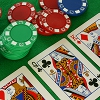 Beat the House Game Beat the House Game
 
Plays: 2953
Category: Casino Games
Beat the House is a poker simulator. Before each hand the player can select the amount of money to bet. Then the game begins by pressing DEAL. The computer provides the player with 5 random generated cards and the player has the possibility to hold or discard each of the cards. By pressing DEAL again the discarded card are replaced with other random generated cards. The player win the hand if one of the following combination is achieved:
ROYAL FLUSH pays 1000 x amount of bet
STRAIGHT FLUSH pays 200 x amount of bet
4 OF A KIND pays 80 x amount of bet
FULL HOUSE pays 20 x amount of bet
FLUSH pays 14 x amount of bet
STRAIGHT pays 10 x amount of bet
3 OF A KIND pays 6 x amount of bet
2 PAIR pays 4 x amount of bet
JACKS OR BETTER pays 1000 x amount of bet
After each hand the player can save the score and quit.
The game is over when the player loses all the money. |  Krazy Keyz Game Krazy Keyz Game
Plays: 2903
Category: Strategy Games
Krazy Keyz is a game involving pressing keys, and not getting distracted! |
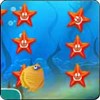 Asterisk 2 Game Asterisk 2 Game
Plays: 2843
Category: Puzzles Games
Funny puzzle game, 42 entertaining levels, pleasant music, casual graphics.By pressing and holding the colored figures you need to grab with the widening contours stars and fish. At that, the contours must not touch each other, shells. | 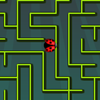 A Maze Race II Game A Maze Race II Game
Plays: 2841
Category: Action Games
May the special power-ups be your aid along the way! In this game you will be racing against the computer in randomly generated mazes, and your goal is to reach the yellow food before the computer does. At each level of the game you will control a red ladybug, while the computer will be represented by a green bug. Use the four arrow keys on your keyboard to move the bug, and you can pick up the special items in the maze and use them to your advantage. The powers of the items are as follows: the red wing will increase the moving speed of your ladybug, the green tortoise will slow down your opponent, the blue arrow will show the correct route to reach the food, and the yellow hammer will let you break a part of the wall by pressing the Spacebar on your keyboard. As you advance in the game, the computer will move at a faster pace, and if it takes the food before you do, the game ends. Utilize the power-ups wisely and help your ladybug to reach the target! |
 Type Timer Game Type Timer Game
Plays: 2795
Category: Education Games
A fun game, where you have to get as many points as you can by pressing the correct letters keys that are displayed on the screen within 40 seconds. |  Play Game Play Game
Plays: 2725
Category: Other Games
Play! The game you win by pressing the Play Button! |
 WorldsFastestTapper Game WorldsFastestTapper Game
Plays: 2695
Category: Action Games
Do you have what it takes to be the "World's Fastest Tapper"? |  The Little Bird Game The Little Bird Game
Plays: 2659
Category: Action Games
The little bird is a very funny game to play. In this game require you to fly in the sky as long as possible by pressing the space key on your keyboard. |
 Strange Fighters Game Strange Fighters Game
Plays: 2597
Category: Action Games
this is a fighting game but with the difference that the characters can not move and no combos :E , i mean this game maybe is not good but not bad neither xD!.
I know the music can be annoying, so if you can’t handle it just turn off pressing ‘m’ or clik in the top (you will see).
Press ‘p’ if you want to pause the game. |  3 Point Shootout Game 3 Point Shootout Game
Plays: 2597
Category: Shooting Games
Basketball player holding the ball in the game with 3 luxury Shooting the basket against the fixed part, and you can perform shots will try to make the highest score in a given period of time. When you log in by clicking on the Play entry operation into the game by pressing the left mouse button, and adjust so that the shot will implement izasina Read the full pot. Have fun. |
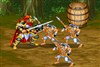 Dynasty Fighter 5 Game Dynasty Fighter 5 Game
Plays: 2596
Category: Fighting Games
Select a character you like to kill all the enemies alone in single mode or fight with your friend in double mode. Good luck! | 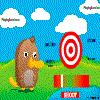 Shooting Master Game Shooting Master Game
Plays: 2564
Category: Action Games
Press the shoot button when the black bar is over the green. You can get more points by pressing when the bar is in the greenest position |
 Football Shake Game Football Shake Game
Plays: 2557
Category: Sports Games
Football Shake is a football game that will test your quality of acrobatics. To control those moves, when you need to kneel, you'll need to press A from the keyboard to avoid crushing with what comes to you. If different thing approaches to you and you feel like you need to jump to avoid it, use the S key from the keyboard to be able to jump. And finally, if you need to jump high, you need to use D to perform a high jump! So avoid what comes on your way by pressing the correct key to perform the wanted action, kneel, jump or high jump. Have a great fun! | 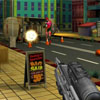 Endless Zombie Shootout Game Endless Zombie Shootout Game
Plays: 2540
Category: Shooting Games
The game is based on mouse movement. You just aim the mouse at the quick moving target, click the mouse to shoot them and keep your gun reloaded by pressing R to do so. Once you have completed shooting the prescribed number of Zombies, the next level unlocks for you. You have 8 formidable levels to pass through. |
 Father In Law Game Father In Law Game
Plays: 2538
Category: Strategy Games
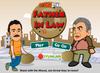
Father In Law of the characters in the game using one of the two facing on the island and off the island by pushing the opposite side of the fixed characters are trying to reduce. Trying to stay on the island, using the keys on your keyboard AWDS by pressing the left mouse button to shoot your opponent will try to reduce. |  Ford Differences Game Ford Differences Game
Plays: 2534
Category: Puzzles Games
Welcome to another game that belongs to the concept of games in which you'll need to find the differences between the pictures, the game called Ford Differences. The goal is to find all of the five differences in the given amount of time. Don't make more than 5 mistakes on the way. If you don't want to play with the limited amount of time, try and play the game without the time limitation. This is to be done by pressing T from the keyboard. Good luck! |
 Traffic Blitz Game Traffic Blitz Game
Plays: 2530
Category: Action Games
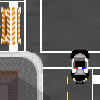
You are an officer who has the sole goal in life to direct traffic. There are no traffic lights at the intersection you have been assigned. The only thing keeping cars from crashing is you. Simply click cars once to stop them, and click stopped cars to accelerate them. Every car that makes it successfully across will earn you $10. Money can be spent at the shop by pressing "S" on items like the Oil Slick, Land Mine, Teleporter, and Barricade. After purchasing an item, the demand for it skyrockets so the price increases by $1. There are three upgrades for each item as well. If you allow three crashes to occur, HQ will promptly fire you but you will be able to submit your number of total cars. | 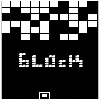 Block Game Block Game
Plays: 2500
Category: Action Games
In this game you will never win, all you can do is survive for as long as you can!
You control a little block at the bottom of the screen; pressing "space" you add new block at the top; when a row is completed, it is destroyed. To stay alive you must have good reflexis and speed; good luck!
p.s. don't even try the easy difficulty: it's only for noobs! :-) |
 EggSavior Game EggSavior Game
Plays: 2385
Category: Action Games
Easy to play Physics puzzle game based on the pink panther. Solve puzzles rolling the eggs back into the basket. Move eggs with arrow keys, and switch selected egg either with the mouse or by pressing space bar. |  Easter Egg Designer Game Easter Egg Designer Game
Plays: 2352
Category: Customize Games
Showcase your creativity and unleash your aesthetic sense by designing your own Easter egg with a beautiful assortment of patterns, shapes and colors! The game opens with a plain Easter egg on the left of the screen, while the available patterns are located at the top right corner, and different types of shapes are placed below the patterns. To apply a pattern, simply click the left or right arrow button next to the pattern samples. The selected sample will be enlarged and shown in the middle of the five boxes, while the pattern itself will be automatically applied to the Easter egg. You may repeat these steps to modify the pattern. To select a type of shape, click the left and right arrow buttons next to the shape samples. The available shapes of the chosen type will be displayed under the sample boxes, for example, when you have selected the snowflake, three available shapes of snowflake will appear under the sample boxes. Click to select any shape you like, then drag and paste it onto the Easter egg. You may click the shape again to adjust its size by using the scroll wheel on your mouse or the + and - keys on your numpad: scroll up or press the + key to enlarge the shape, and scroll down or press the - key to reduce the size. You may also rotate the shape by pressing the left and right arrow keys on your keyboard. If you no longer wish to apply a shape, you can click to select it, then drag and drop it to the bin on the right of the Easter egg. When you have completed the design, click the "Add some color" button at the bottom right corner to proceed to coloring. You will then be given a palette of 35 colors on the right of the Easter egg. To apply a color, simply use the paint brush to select a color, then move to the desired position on the Easter egg. The area will be circled and enlarged so that you can apply the color easily. Click to paint the color, or choose another color if you wish. You may reapply colors to a certain area, or you can click the topmost arrow button on the left of the screen to undo the previous action. If you would like to clear all colors, simply click the Reset button at the bottom of the palette. You may also click the buttons on the left of the screen to save the image, print the outline, print the image in color, or clear all colors and return to the design page. Click the Finish button at the bottom right corner when you have completed all steps, and a score will be given based on the richness of your design and the time you have spent. Come and participate in the unique celebration of Easter! |